What's New
Recent additions to Nichols Software.
StinkBugs is now Nichols Software
StinkBugs was the code name we used while building the product. It now ships under our company name, Nichols Software. Nothing changes for your account, projects or published sites: they keep working at the same addresses, and you sign in the same way.
Build your own reports
Reports in the top bar lets anyone on your team build reports from your CRM by dragging fields onto a page, like SQL Server Reporting but made for a trade office. Pull in fields from linked records, total by status or month, add a bar, line or pie chart, and filter with All / Any and either/or groups, with a line that says in plain words what the report shows. Calculated columns work out balances, percentages and days between two dates without a formula. Download any report as Excel, PDF or CSV; on Business and Pro, email it on a schedule. Every project starts with ready-made reports for its trade, and Show the SQL shows exactly what a report runs. See Reports.
Reports on your website
The new Saved Report component puts a report on any page: chart, table, a date range visitors can change and download buttons. Anyone who can open the page sees it, so turn on Requires Login for pages with customer details. The older report component is now called Dashboard Tile. See Reports.
Pick every picture from Assets
Logo Strip, Menu List, Team Grid, Trust Badges and Photo Gallery pictures, and the poster image on Video and Video 50/50, can now be picked from Assets with a thumbnail and Browse, like the Image Carousel - or set by web address.
HVAC Maintenance Plans
The HVAC CRM now sells and runs maintenance plans. Add + Maintenance plan to any estimate or install invoice, on its own or as Good / Better / Best, covering the customer's equipment. Approval puts the member's spring and fall tune-ups on a due list and starts plan billing. Book tune-ups from the list or email members a "pick your day" link. Techs tick the checklist and log readings on their phones, weak capacitors are flagged, recommended repairs become an estimate with the member discount, and the customer gets a report. Each unit keeps its readings year to year, so you can quote a replacement before it fails. Equipment orders also drop the "Quoted" step: quotes live on estimates. See HVAC Maintenance Plans.
Lawn Week Board
Lawn season in the lawn & snow CRM gets its own board. Give each lawn customer a crew, a day and how often (every week, every 2 weeks, every 4), and each day's lists fill themselves. Crews see the whole week on their phones and can take a stop, move stops to another crew or day, change a customer's regular slot, mark a crew down or add a one-off job like a cleanup. A lawn not done rolls to the next working day, Saturday is for catching up, and one tap pushes a rained-out day to the next. Stops on both boards can be moved up and down into driving order, and the two boards replace the Route Board in the menu. Monthly billing now makes one bill per customer, with the contract instalment and the logged work together. See Lawn Week Board.
Snow Storm Board
Snow removal in the lawn & snow CRM now runs from a Storm Board built for a crew with trucks and phones, not an office. List your trucks and give each plow customer a usual truck; when it snows, one tap puts every customer on a truck's list. Any driver can take a stop, move stops to another truck, or mark a truck down so its unfinished stops are shared out among the others. Drivers can book a caller on the spot, log each driveway as they finish and bill it then or on the monthly bill. It replaces Storm Events. See Snow Storm Board.
Pest Control Starter
A new starter pack for pest control companies: a website with home pest plans, commercial service, termites, mice and wildlife, mosquito and tick season and a request-an-inspection form, and a CRM built around service plans. A plan estimate offers Good / Better / Best; when the customer approves, the plan is made with a year of visits and its monthly billing. Techs work from the day's route on their phone: what they found, the products used (with EPA numbers), bait stations and photos, then a service report emailed to the customer. Every product used is kept in the application records, ready to print or download. See Estimate tools for your trade.
Good / Better / Best, and estimate builders for every trade
Any estimate can now offer Good, Better and Best options: the customer sees them side by side, picks one and signs. The trade CRMs also got builders that put a whole job together from your own prices - + System for HVAC, a flat-rate price book with panel, EV charger, water heater, drain and repipe builders for electricians and plumbers, phases, cost and markup, sub quotes, allowances, payment schedules and change orders for general contractors, lawn and snow seasons priced from the property's measurements that turn into contracts when approved, and repair-shop jobs (labor at your rate, parts on your markup scale) that customers approve one by one. See Estimate tools for your trade.
Project Files now load on your live site
The .js and .css files you upload to Project Files now load on your
published site and your own domain, not just in the Studio preview. Upload a file under
Settings → Project Files on any project card, copy the <script> or
<link> tag it gives you, and paste it into Website Settings' Header/Footer HTML for every page,
or a Custom Code component for one page.
Two-factor sign-in
You can now protect your account with a code from an authenticator app on your phone, asked for after your password, so someone who learns your password still can't sign in. It's optional: press Hello, your name at the top of any page, then Turn on two-factor sign-in, and keep the recovery codes it gives you for when you don't have your phone. See Sign-in & Security.
QuickBooks Online
On Business and Pro, your invoices, the customers on them and every payment now go to QuickBooks Online by themselves. Open QuickBooks in your CRM menu and press Connect to QuickBooks. Invoices keep their number with an SB- in front, voids and undone payments follow them over, and the QuickBooks page shows everything sent. See QuickBooks.
Try Business or Pro free for 14 days
Business and Pro now start with a 14-day free trial, no card needed. Choose either one when you sign up, or press Try Business free or Try Pro free on the Billing page. Subscribe any time to keep it; otherwise your account moves to Free and nothing is deleted. See Plans & Billing.
Your own domain name
On Business and Pro, your site can now live at your own address, like www.yourbusiness.com. Type it in the project's settings, add one CNAME record where you bought the domain, and it's live with a free SSL certificate, usually within 15 minutes. The bare domain (yourbusiness.com) sends visitors to www. See Custom Domains.
Trade calculators, and a Calculator app for your crew
Door, HVAC, plumbing and electrical CRMs now have Calculators in the menu. Doors get the spring calculator with two new tabs - one spring ↔ two springs, and door weight from the springs. HVAC gets room load, airflow and duct size; plumbing gets tank and tankless water heater sizing and pipe velocity; electrical gets voltage drop, wire size and Ohm's law. On Business and Pro they can also be a third Android app, just the calculators, for your crew. See CRM and Mobile App.
New plans: Free, Business and Pro
Builder is now Business ($29 a month), and it includes online payments and texting your customers, which used to need Pro. Business has 3 sites and 3 office logins, and no "Made with Nichols Software" link on your site. Pro is $79 a month, with 10 office logins, 20 GB and code export. Crew logins are unlimited on every plan, and paying yearly is two months free. See Pricing.
Texting
On Business and Pro, text customers from your own Twilio number: appointment reminders, estimate and invoice links, an "on my way" button for the crew, and two-way conversations under Texts. You choose which texts go out. See Texting.
New: General Contractor starter pack
A site and CRM for a residential remodeler: kitchens, baths, basements, additions and decks, a how-we-work page, a project gallery with a before-and-after slider, and a free-estimate form that creates leads. Its CRM tracks each job's phases, subcontractors (with insurance dates and W-9s), change orders, permits, inspections and punch list on one job page, with job photos and reports. Find it under Starter Packs.
Job photos
Crews can take before and after photos on service calls and installation jobs right from their phone. The office sees them on the job and the customer's page, and customers see them on their invoice. See Job Photos.
Automations and a Book Online button
New Automations add follow-ups for you - chase estimates nobody has answered, collect unpaid invoices, schedule approved work and call new leads. The new Book Online / My Account Button puts your booking page or customer portal on your site in one step. And card numbers typed into notes or forms are now removed before they're saved. See Automations.
Online payments
On Business and Pro, customers can pay invoices and estimate deposits online by card, Apple Pay, Google Pay or bank, straight into your own Stripe account. Payments are recorded on the invoice by themselves, with receipts and refunds. Nichols Software adds no fee. See Online Payments.
Online booking, plan billing, a customer portal and a CRM calendar
Customers can ask for a visit from your booking page, and see their appointments, estimates and invoices in their own portal. Maintenance plans bill themselves on schedule as draft invoices for you to send. And the CRM now has a month calendar of every appointment. See Online Booking, Customer Portal, Plan Billing and Calendar.
Customer import, follow-ups and a calendar feed
Bring your customer list in from a spreadsheet in a couple of minutes, with duplicates skipped. Add dated follow-ups to any customer or lead and work through them from one list. And put your jobs in Google, Apple or Outlook calendars - the whole company's, or each tech's own. See Importing Customers, Follow-ups and Calendar Feed.
Signed approvals, deposits and review requests
Customers now sign when they approve an estimate online - a typed name and, if they like, a drawn signature. Estimates can ask for a deposit, invoices take partial payments and show the balance due, and after an invoice is paid Nichols Software can email the customer your review link. See Estimates & Invoices and review requests.
Estimates, invoices, a pipeline board and appointment reminders
Every CRM can now email an estimate the customer approves with one click, turn it into an invoice, and record the payment, with a receipt sent for you. The new Pipeline shows every open lead and estimate by stage, with what you've won this month and your close rate. And Reminders emails customers before each appointment. See Estimates & Invoices, Pipeline and Appointment Reminders.
Your site as an Android app, with push notifications
The new Mobile App screen builds your site into an app for Google Play. The customer app gets a bottom tab bar made from your pages and lets you send announcements to everyone who turns notifications on. The crew app opens your CRM and alerts signed-in staff the moment a lead comes in from your website. The app shows your live site, so edits appear without an app update. Building the app is on the Business and Pro plans; announcements are on Pro. See Mobile App.
Every project gets its own database, on every plan
Free and Builder projects now get their own dedicated database too, just like Pro. It's created automatically when you make a project, so your CRM records never share a database with another customer's. See Plans & Billing.
Self-hosted exports now match your published site
An exported site now includes only your published pages, as last published, and keeps
members-only pages behind a sign-in your site users can use. Contact forms save submissions and
email you through your own SMTP account, and search, content lists, redirects,
sitemap.xml and robots.txt all work on your own server. See
Deployment Options.
Queries, Reports and Data Grids now work in self-hosted exports
Export your project and its data components come with it: Queries (and each query's own
/q/ results page), Reports, and Data Grids - with editing, bulk actions, saved views
and CSV export - show the same live data on your own server, to you and your signed-in staff.
See
Data Pages & Queries and
Deployment Options.
Video tutorials, all in one place
Every Nichols Software walkthrough video is now on one page, and you don't need an account to watch. Most are under a minute. See Video Tutorials.
Pin your favorite projects to the top
A pin icon on every project card keeps the projects you use most at the top of the Projects page. Pinned projects come first, then everything else, each in A-Z order. Pins are personal to you. See Getting Started.
Row actions on Query pages
Add View or Edit buttons to every row of a Query. Pick the page to link to from a list and the link fills itself in. Insert field adds any of the query's own fields to it, so there's no placeholder syntax to remember. The Actions column stays in view on wide lists, and the Query Builder now draws a small diagram of how your tables are joined. See Data Pages & Queries.
New Query component for the Page Builder
Drop a saved Query onto any designed page: a read-only, searchable, sortable list that joins several related tables, with more rows loading as you scroll. See Data Pages & Queries.
The Schema Canvas: see how your tables relate
Generating CRUD pages used to mean picking from a long alphabetical checklist of tables. Now you get a diagram of your database, with related tables connected by lines and key columns marked. Pick fields across several related tables and choose Build Page from Selected Fields; Nichols Software works out the joins for you. See Data Pages & Queries.
Structured data for AI answer engines and rich results
Every published page now carries structured data (JSON-LD) describing your business - name, logo, and, if you fill it in, your address and phone under Website Settings → Business info. This is what lets Google's AI Overviews, ChatGPT, and search rich results correctly identify who you are instead of guessing. A Reviews Widget or Team Grid component on a page contributes its ratings and team members automatically - nothing extra to configure. See Page Builder.
All starter packs are now free on every plan
The trade CRM packs - Overhead Doors, Electric, Plumbing, and HVAC - used to require a Builder plan or higher. Every starter pack in the library, including those and the new Automotive Repair pack below, now imports on any plan, Free included. See Starter Packs.
New: Automotive Repair Shop starter pack
A ready-made site for auto repair shops, with a matching CRM for vehicles, repair orders, work orders, warranty records, and service reminders - plus its own Reports section. See Starter Packs.
Four new Page Builder components
Sticky Call Button, Trust Badges, Reviews Widget, and Business Hours are now available in the component picker. See Page Builder for the full list.
Project Files: a home for your own .js and .css
Every project now has a Project Files area for hosting your own JavaScript
and CSS files - separate from Assets, which is for images and
documents, not code. Upload a .js or .css file and you get back a
stable URL plus a ready-made <script src> or
<link rel="stylesheet"> tag to copy. Paste it into
Website Settings' Header/Footer HTML for something every page should load,
or into a page's Custom Code component's new External CSS/JS URL fields for
just one page. Open it from Settings → Project Files on any project
card.
Send contact-form emails through your own SMTP account
Website Settings now has an Email (SMTP) section - turn it on and give a project its own SMTP server, port, username, password, and from address, and its contact-form notifications send through that account instead of Nichols Software's shared relay. A Send test email button lets you confirm the connection actually works before relying on it; if a send ever fails, it automatically falls back to the shared relay so a notification is never silently lost.
Automatic checkpoints on publish
Every time you publish a page, Nichols Software now saves a whole-project checkpoint automatically, labeled "Auto: publish" - so there's always a recent restore point without having to remember to make one yourself. Only the most recent 20 automatic checkpoints are kept; any you create by hand are never removed.
Smarter images for New Page from URL
New Page from URL fills empty image slots with a matching stock photo when you give it a search term. Leave that field blank now and it guesses a term from the new page's own title instead, so image slots are never left empty - still never pulled from the source page or URL.
Crew pay for every trade
The overhead-door, HVAC, electric, and plumbing CRMs now have a Pay Setup screen for setting each staff member's pay basis (hourly or piece-work) and rate, plus a Crew Payroll report totaling what each technician earned. Piece rates are per-square-foot for door installs, and a flat rate per completed job for the other trades - service calls are always hourly.
Reports for every CRM
Every CRM now has its own Reports tab - revenue, job volume, aging, and renewals for the trade dashboards, and a matching set for the AI-built and starter-pack CRMs, tailored to what each one actually tracks. Open it from the CRM nav on any project.
The DAM is now “Assets”
The Digital Asset Manager has been renamed Assets throughout Studio -
same feature, clearer name. Open it from Assets in the nav or any project
card. Old links keep working: /dam/explorer now redirects to
/assets/explorer, and the help page moved to
/help/assets. Nothing about your uploaded files, folders, or
crops changed.
AI CRM Generator
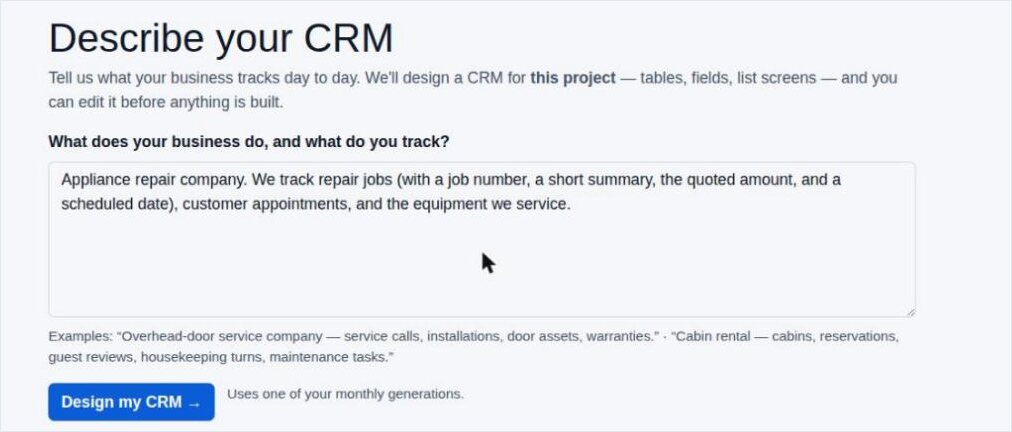
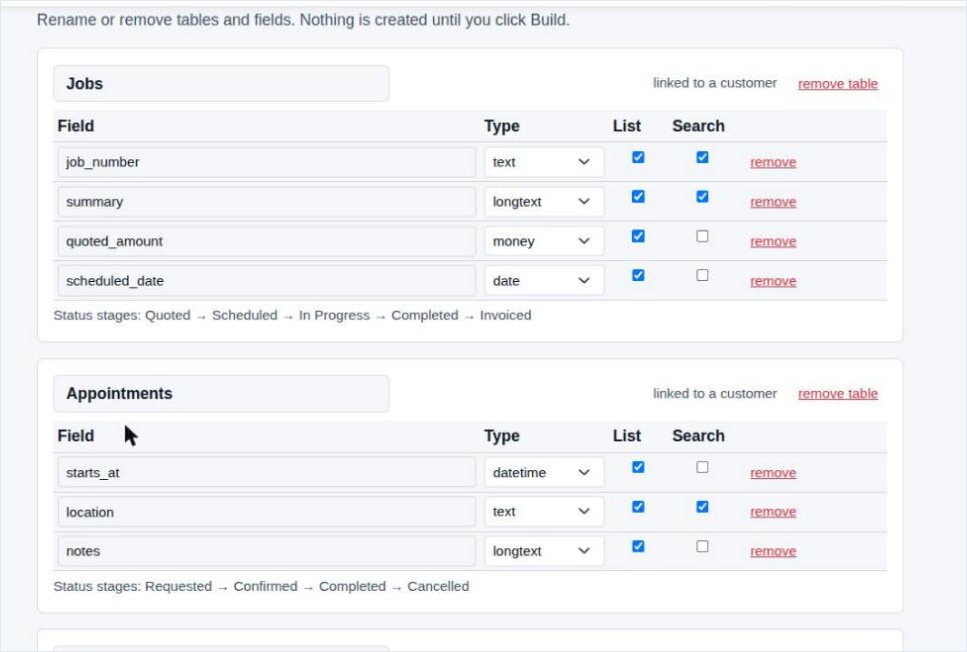
Describe your business in plain language and Nichols Software designs a CRM to match - the tables, the fields, and the list and detail screens - which you review and edit before anything is created. It's built for the times no starter pack fits your line of work.
- Start it from the Describe a CRM button on any project card in the Studio dashboard, or ✨ Describe your own CRM in the Starter Pack Library.
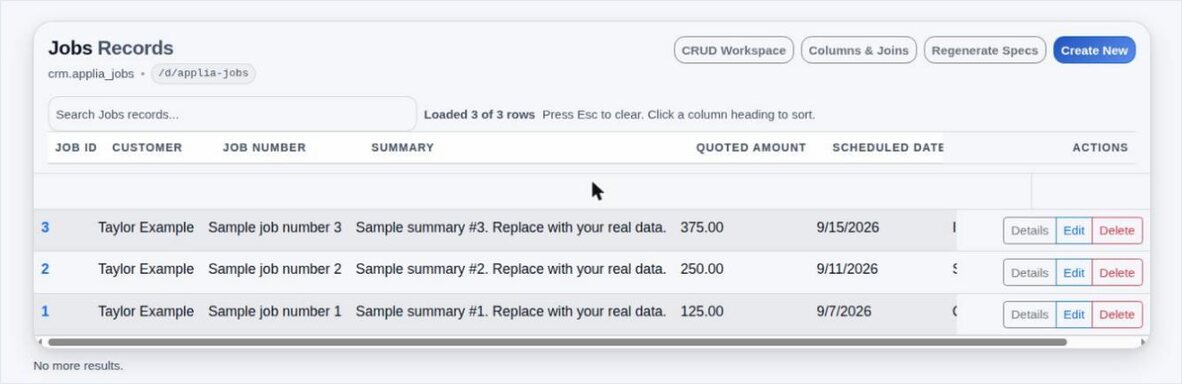
- You get a four-step flow: describe it, review the proposed tables and fields, build, then run it. Nothing touches your database until you click Build.
- Generated tables show up as cards on the CRM Hub, each with a searchable list and add, edit, and detail views, alongside the base Leads and Contacts screens. New tables link to your existing customers and leads.
- Included on every plan with a monthly allowance - Free 10, Builder 25, Pro 50, Platform 100 - plus top-up packs from the Billing page when you need more. See Plans & Billing.
Full guide: AI CRM Generator.
Renaming a page never breaks a link
Change the URL of a live page and Nichols Software now redirects the old address to the new one automatically - visitors and search rankings keep working instead of hitting a 404. You can also add your own redirects by hand from Pages → Redirects for any URL, not just renamed pages.
Better SEO, automatically
Every published site now gets a sitemap.xml and a search-engine-aware
robots.txt generated for it, and Nichols Software pings search engines with your
updated pages each time you publish. Nothing to turn on or configure - it's part of
publishing a live site.
Your published sites are installable
Every site you publish is now an installable web app - on a phone, a visitor can add it to their home screen and open it like any other app; on desktop, most browsers offer an install option in the address bar. Nichols Software generates the app manifest and icon for you, so there's nothing to set up.